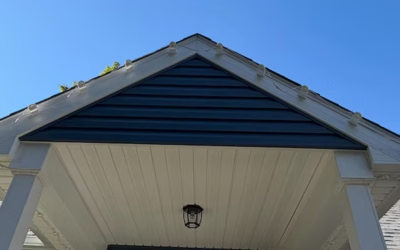
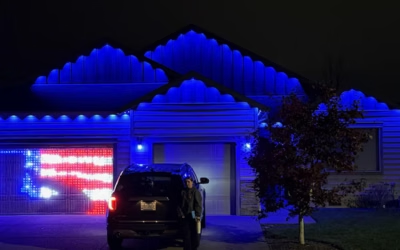
Installing Lumary permanent outdoor lights for a clean roofline requires careful planning, testing every component before mounting, cleaning surfaces with isopropyl alcohol, maintaining consistent 16.5-inch spacing, and choosing secure mounting hardware. Taking these steps upfront results in a symmetrical, professional-looking lighting system that lasts for years.
I used to dread the holiday season ritual of dragging out ladders, untangling string lights, and hoping nothing shorted out in the rain. Once I switched to a permanent outdoor lighting system, that annual headache disappeared. No more climbing onto the roof every November, no more replacing strands every January.
Proper planning is what separates a clean, professional-looking installation from a crooked, uneven mess. Permanent outdoor lighting systems like Lumary are built to stay in place year-round, which means the install needs to be right the first time. Rushing the process almost always shows up later as sagging wires, mismatched spacing, or lights that just don't sit flush against the roofline.
Lumary permanent outdoor lights are a smart lighting system designed specifically for year-round use, combining weatherproof construction with app-based color and scheduling controls. This guide walks through the complete installation process from initial planning to final testing, based on how I've approached the job on my own home.
While Lumary includes its own mounting hardware, I also use Deliciosa Decor's custom low-profile mounting brackets, which are designed specifically for the Lumary Permanent Outdoor Eaves Lights Max. They've made a noticeable difference in how clean the finished install looks.
Why I Chose Lumary Permanent Outdoor Lights
Lumary permanent outdoor lights stand out because they're built for installation once and enjoyment for years, not a seasonal chore. A few features sold me on the system:
- No more annual ladder trips. Once mounted, the lights stay in place through every season and every holiday.
- Energy-efficient LED technology. LEDs use significantly less power than traditional incandescent string lights, which Energy Star notes is one of the main reasons LED lighting has become the standard for both indoor and outdoor use.
- Weather-resistant IP67 construction. This rating means the lights are built to handle rain, snow, and dust without failing.
- Long lifespan. Lumary rates these lights for up to 50,000 hours, depending on usage patterns.
- Bright, consistent output. Each LED produces approximately 60 lumens.
- Full color range. The system supports 16 million colors alongside a dedicated tunable white channel (2200K–6500K) for everyday lighting.
- Smart control options. You can manage the system through the Lumary App, Alexa, or Google Assistant using your phone as a remote.
- Flexible kit sizing. Kits are available with 40, 80, or 120 LEDs across three system lengths, so you can match the kit to your home's roofline.
If you want a broader comparison of what's available before committing to a system, Lumary's own blog on choosing permanent outdoor lights is a useful starting point.
Step 1: How Do I Plan My Roofline Before Installing Permanent Outdoor Lights?
Planning is the step most people are tempted to skip, and it's also the one that saves the most time later. Before I touch a single bracket, I walk the entire perimeter of my house and take stock of what I'm working with.
Walk Around Your Home
- Measure every roofline section, not just the front-facing ones.
- Measure soffits where the lights will run.
- Note valleys where two roof planes meet.
- Note corners, since these require careful spacing adjustments.
- Note any roofline changes in height or angle.
Locate Key Infrastructure
- Outdoor outlets near where the power supply will connect.
- The ideal power supply location, ideally weatherproof and close to an outlet.
- Control box placement, somewhere accessible but protected from direct weather.
- Wi-Fi signal strength at the mounting location, since the system requires a 2.4GHz connection.
Try to avoid relying on extension cords where possible, and always confirm your planned power supply location is weatherproof. For general guidance on measuring and planning exterior home projects, This Old House has solid, practical advice that applies well beyond just lighting.
It's also worth checking a short-range forecast before you start, especially if you're working with adhesive-based mounts. The National Weather Service is a reliable way to confirm you've got a dry window for installation.
Step 2: Why I Test Every Component Before Installation
Before I mount anything, I connect every light strand to the power pack, plug it all in, and run a full test on the ground. Here's my process:
- Connect all light strands together as they'll be arranged on the roofline.
- Connect the power pack.
- Plug everything in.
- Connect to the Lumary App.
- Check for and install any firmware updates.
- Test every single LED for consistent color and brightness.
Installing a defective section after it's already mounted on your roofline wastes far more time than testing on the ground ever will. I'd also add: the Lumary app isn't the most intuitive interface I've used, so spending ten minutes getting familiar with it before you're on a ladder makes the entire setup process smoother.
Step 3: How Does Lumary's 16.5-Inch Spacing Affect My Roofline's Look?
Consistent spacing is what makes a permanent outdoor lighting system look intentional rather than improvised. Lumary spaces each light puck 16.5 inches apart, and sticking to that measurement is what creates a symmetrical, even look across your entire roofline. Uneven spacing, even by an inch or two in a few spots, is one of the fastest ways to make a home's exterior look unfinished.
Before mounting, I map out:
- The beginning point of the run.
- The ending point of the run.
- Corner transitions, where spacing often needs small adjustments.
- Roof peaks, which can throw off a straight run.
- Eaves, where the lights typically sit.
Planning jumper wire locations matters just as much as planning the lights themselves. Jumper wires let the system travel from one roof section to another without placing LEDs where they aren't needed, like across a garage door or a section with no soffit.
Step 4: Why Cleaning the Mounting Surface Matters
This step gets skipped more than any other, and it shouldn't be. Before mounting any bracket or adhesive strip, I clean the entire mounting surface with isopropyl alcohol and alcohol pads.
Cleaning removes:
- Dirt
- Oils
- Dust
- Pollen
Any of these can prevent adhesive from bonding properly, which shortens the life of the installation. A clean surface directly improves adhesive performance, long-term durability, and how well the mounts hold up against wind and rain. If you're installing in a region with heavy pollen seasons or frequent dust, this step becomes even more important.
Step 5: Adhesive or Screws—Which Mounting Method Should I Choose?
There are two main mounting methods for permanent outdoor lights, and each comes with tradeoffs.
Adhesive Mounting
Pros:
- Fast to install
- Clean appearance with no visible holes
- No drilling required
Cons:
- Surface preparation is critical; skip Step 4 and adhesion will suffer
Screw Mounting
Pros:
- Most secure option available
- Best choice for long-term, permanent installations
Cons:
- Takes more installation time
Choose adhesive mounting if speed and a hole-free finish matter more to you, and choose screws if you want maximum security for a truly permanent installation. For guidance on electrical safety during any exterior installation, UL Solutions publishes helpful standards and safety information worth reviewing.
Lumary includes its own mounting clips and hardware in every kit, which work fine for a standard install. That said, I personally upgrade to Deliciosa Decor's mounting accessories, including their:
- 8mm low-profile brackets
- 2.5-inch mounting brackets
- Controller mounts
- Power supply mounts
The benefits are noticeable: a cleaner overall appearance, better wire management, and a more professional finish than the stock hardware alone provides.
Step 6: How Do I Install Each Light Section Without Mistakes?
With planning and testing done, actual installation moves quickly. Here's the order I follow:
- Start at the power supply location.
- Mount one section at a time rather than rushing the whole roofline at once.
- Keep wires straight as you go.
- Verify spacing against your Step 3 plan as you mount each section.
- Don't pull wires tight; leave a small amount of slack for temperature changes.
- Secure clips firmly at each mounting point.
- Install brackets according to your chosen mounting method.
- Connect each strand back into the power pack as you complete each section.
Working section by section, rather than trying to mount an entire roofline's worth of lights in one pass, keeps spacing accurate and reduces mistakes.
Step 7: How Do I Keep Wires Hidden and Organized?
Exposed, sagging wiring can undo an otherwise perfect installation. This is the step that separates a DIY job from a professional-looking one, and it's worth taking seriously.
My approach includes:
- Following the natural line of the soffit wherever possible.
- Hiding wires behind fascia or trim when the design allows it.
- Using clips at regular intervals to prevent sagging.
- Using jumper cables to skip sections cleanly instead of running exposed wire.
- Placing the controller somewhere both accessible and visually unobtrusive.
- Avoiding wire sag by not stretching the strand too tight or too loose.
Professional installers often spend nearly as much time on wire management as they do mounting the lights themselves. It's tedious, but it's the detail that makes the difference between a good installation and a great one.
Step 8: How Do I Configure the Lumary App After Installation?
Once everything is mounted, the Lumary App is where the lighting system comes to life.
- Connect using a 2.4GHz Wi-Fi network (the system won't pair with 5GHz).
- Pair each light strand with the app.
- Rename the installation for easy identification.
- Create zones if you want to control different sections independently.
- Adjust brightness to your preference.
- Set your white temperature anywhere between 2200K and 6500K.
- Experiment with RGB colors across the full 16-million-color range.
The app supports 55 preset scenes, countdown timers, scheduling, and voice assistant integration through Alexa and Google Assistant. If you're setting up voice control for the first time, Google Home Help and Amazon's Alexa support page both walk through the device-pairing process clearly.
I'll be honest: the app can feel basic in a few areas, and the interface isn't always intuitive. Once it's configured, though, it offers plenty of customization for day-to-day use.
Step 9: What Lighting Scenes Should I Create for Different Occasions?
One of the biggest advantages of a permanent outdoor lighting system is switching occasions without touching a single wire. Some of the scenes I've set up include:
- Christmas
- Halloween
- Independence Day
- Game Day
- Weddings
- Everyday accent lighting to set the mood
- Security lighting
Automated routines add convenience, and they can also serve a practical security purpose by keeping your home's perimeter illuminated on a schedule, even when you're not home to turn lights on manually.
Step 10: What Should I Check During a Final Inspection?
Before calling the installation finished, I walk the entire roofline one more time and inspect for:
- Loose wires
- Loose brackets
- Crooked lights
- Adhesive that hasn't fully bonded
- Screw tightness
- Corner transitions
- Brightness consistency across the full run
- Wi-Fi connection stability
- App control responsiveness
- Scene activation
Small adjustments at this stage take minutes. Skipping this step means potentially climbing back up for repairs later, which defeats the purpose of going permanent in the first place.
Common DIY Installation Mistakes I Avoid
After going through this process, a few mistakes stand out as the ones most likely to ruin an otherwise solid installation:
Crooked light pucks. Even a slight tilt is noticeable from the ground once the sun goes down.
Uneven spacing. Straying from the 16.5-inch measurement creates a roofline that looks off-balance.
Dirty mounting surfaces. Skipping Step 4 is the single fastest way to compromise adhesive performance.
Ignoring roofline changes. Valleys, peaks, and corners all need individual attention, not a one-size-fits-all approach.
Poor wire management. Exposed, sagging wires are the most visible sign of a rushed job.
Weak Wi-Fi signal. Without a stable 2.4GHz connection, app control and scenes won't function reliably.
Not testing lights before mounting. Finding a dead LED after installation means undoing work you already finished.
Stretching wires too tight. This puts stress on connections and can lead to premature failure.
Forgetting expansion planning. Lumary systems can be expanded across very large rooflines, up to approximately 1,200 feet depending on controller and system configuration, which makes upfront planning especially important if you think you'll add to the system later.
Why I Use Deliciosa Decor Mounting Solutions
Deliciosa Decor's mounting accessories are designed specifically around the Outdoor Lumary Max Lights, which is part of why I've stuck with them over the stock hardware alone. A few reasons they've earned a permanent spot in my installation toolkit:
- Precision fit for Lumary's eave light system
- Low-profile design that stays visually unobtrusive
- Cleaner overall appearance across long rooflines
- Better long-term durability
- Dedicated controller mounts
- Dedicated power supply mounts
- Designed for both homeowners and professional installers
- Veteran-owned craftsmanship behind every product
If you're planning your own installation, it's worth exploring Deliciosa Decor's growing collection of Lumary-compatible mounting accessories, including their Lumary mounting brackets, before you start. They also offer compatible mounts for other popular systems, including Eufy light mounts, Govee light mounts, and Nanoleaf mounts, along with broader permanent outdoor lighting accessories, custom light mounts, and their veteran-owned home décor line.
Frequently Asked Questions
How much do Lumary Pro lights cost?
The amount if money you spend will vary depending on kit size, LED count, and retailer. Rather than quoting a fixed price, I'd recommend checking current pricing directly on Lumary's site or through authorized retailers, since promotions and kit configurations change regularly.
What are the downsides of permanent lights?
The main downsides are upfront cost and installation time compared to seasonal string lights. Permanent systems also require more careful planning around spacing, mounting, and Wi-Fi connectivity since they're meant to stay in place for years rather than a single season.
Are Lumary lights good?
Lumary lights offer a strong combination of weather resistance (IP67 rating), a long rated lifespan of up to 50,000 hours, and extensive smart control options through the Lumary App, Alexa, and Google Assistant. Whether they're the right choice depends on your priorities around color customization, app control, and budget.
Who makes the best permanent outdoor lights?
The best permanent outdoor lighting system depends on what matters most to you. Choose Lumary if smart app control, color customization, and quality tunable white lighting are priorities. If you're comparing against other brands, it's worth reviewing each system's IP rating, LED lifespan, and app functionality before deciding.
Can I install Lumary permanent outdoor lights myself?
Yes, Lumary permanent outdoor lights are designed for DIY installation. Careful planning, proper surface cleaning, and consistent spacing are the key factors that determine whether a self-installed system looks professional.
Do I need screws if the lights already have adhesive?
No, adhesive mounting is sufficient for many installations, particularly when the mounting surface is properly cleaned beforehand. Screws offer more long-term security and are worth considering if you want maximum durability over several years.
Can jumper wires go between separate rooflines?
Yes, jumper wires are specifically designed to let the lighting system travel between roof sections, such as across a garage door or gap, without placing LEDs where they aren't needed.
How long do Lumary permanent outdoor lights last?
Lumary rates its LEDs for up to 50,000 hours of use, though actual lifespan depends on usage patterns, including how often scenes and brightness levels change.
Can Lumary lights stay outside all year?
Yes, Lumary permanent outdoor lights are built with IP67 weather-resistant construction, which is designed for year-round outdoor exposure, including rain and temperature changes.
Do Lumary lights work with Alexa and Google Assistant?
Yes, the system integrates with both Alexa and Google Assistant in addition to the dedicated Lumary App, giving you multiple ways to control scenes, brightness, and scheduling.
Final Thoughts
A clean, professional-looking permanent outdoor lighting installation comes down to a handful of consistent habits: plan the entire roofline before you start, test every component on the ground, clean mounting surfaces thoroughly, keep spacing consistent at 16.5 inches, manage wires like a professional would, and choose mounting hardware built for long-term durability.
Investing the extra time during installation, rather than rushing to get lights up quickly, results in a lighting system that looks sharp and holds up for years rather than months. Once the hardware is in place, configuring the smart features is the easy part, and it's where you get to actually enjoy what you built.